
Run class from your phone Instructor Pack
Pair your phone with the big screen by scanning a QR code. The class sees the monitor; only your phone shows the rhythm name and the answer key. It works with the ECG simulator, ACLS Scenarios and the Monitor.
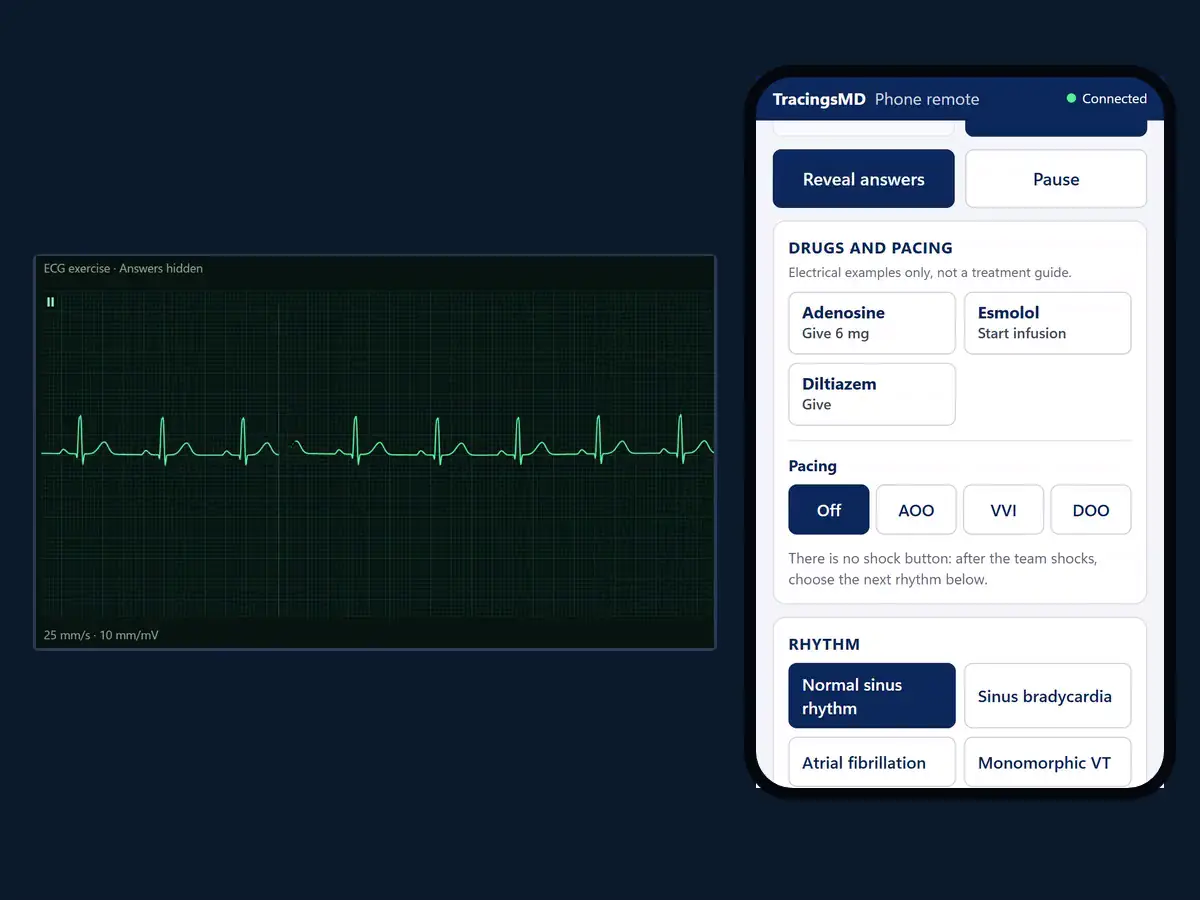
Your Instructor Pack
Run the Simulator, an ACLS case or the Monitor from your phone while you lecture, keep the live session for the whole class, and save files without the tracingsmd.com mark for commercial work.
First ten instructors: the Instructor Pack free for one year
If you teach ECG, ACLS or mechanical ventilation, the first ten instructors who write to us get the Instructor Pack free for one year. In return, use it in a real class, tell us what worked and what got in the way, and give us one sentence about it that we may quote with your name and role (or without them, if you prefer).
Email the address you sign in with, what you teach and who your learners are. We add the pack to that address and it appears when you sign in. Nothing to pay, no card.
Simulator: quiz rhythms with answers hidden
Show a live rhythm without its name, let the class read it, then reveal the answer. The heart keeps running while you switch.
- Build a queue. Switch the Simulator to Build. Choose a rhythm, set its rate, variant, view and lead, then press Queue beside Quiz me and + Add current. On a wide screen the list then stays beside the monitor, so each next rhythm is one more + Add current. Repeat for each setup you want to show.
- Present it. Press Start quiz. Next rhythm (→, N or a clicker's PageDown) steps through your queue, and Reveal answers shows the name. With an empty queue, Next picks a random rhythm.
- Share a coded link. While answers are hidden, open Save and press Copy rhythm link. The link opens the same rhythm, rate, variant, view and lead with answers hidden, and the address shows a short code instead of the rhythm name. The code only keeps the name out of sight; it is not a secret. Added layers, noise and drugs are not included.
The queue is kept in this browser. With an account, Sync on the Account page keeps a copy for your other browsers.
ACLS Scenarios
Adult resuscitation cases on a live monitor: at each check the class chooses what should happen now and reads why, and names the rhythm when names are hidden. Full screen fits a projector, and Copy case link sends one case to learners.
Practice strips: class screen and worksheets
Every practice strip on one page, with the answer folded under each strip. Press Class screen to show one strip at a time, full screen and with no words, then reveal the answer with Space or a tap when the room is ready. Or print the worksheet and the answer key separately; the ECG quiz page prints the same way for theory questions.
For a handout, the rhythms page has every rhythm in one printable table with its rate, rhythm, P waves, PR, QRS and QT.
ECG Practice
Theory questions and interpretation cases with annotated answers, for learners to work through on their own. No account is needed.
ECG Basics
Short lessons from heart anatomy to the 12-lead ECG to read before class, and a rhythm reference with look-alikes.
To put a rhythm in your course, press Embed under its strip on the rhythm page and paste the code into a Canvas, Moodle or Blackboard page (they usually accept iframes). Learners see the recorded strip with a link back to the live rhythm page.
MV Simulator
Set volume or pressure control and show pressure, flow and volume waveforms next to model arterial blood gases.
MV Cases
Guided ventilation cases, such as ARDS and PEEP or airflow obstruction. When a case is complete, Copy text summary gives the learner's records, changes and predictions as plain text for the debrief.
Instructor Pack
For instructors and creators: run the Simulator, an ACLS case or the Monitor from your phone while you lecture, keep the live session for the whole class, and save files without the tracingsmd.com mark for commercial work. Everything above stays free.
One payment, no subscription.
Before class
A free live session lasts up to 30 minutes and closes when you close the tab, or after 2 minutes paused (5 when signed in); with an Instructor Pack it lasts up to 4 hours (10 minutes paused). The Simulator says so 5 minutes before the end, and Start new session keeps the rhythm and its settings, but save the PNG, video or replay files you need ahead of time. A browser runs one live Simulator monitor at a time, so for a large class, project one screen or share saved files.
Free files are for non-commercial teaching and study.